MQTT Integration
Settings available on the local dashboard
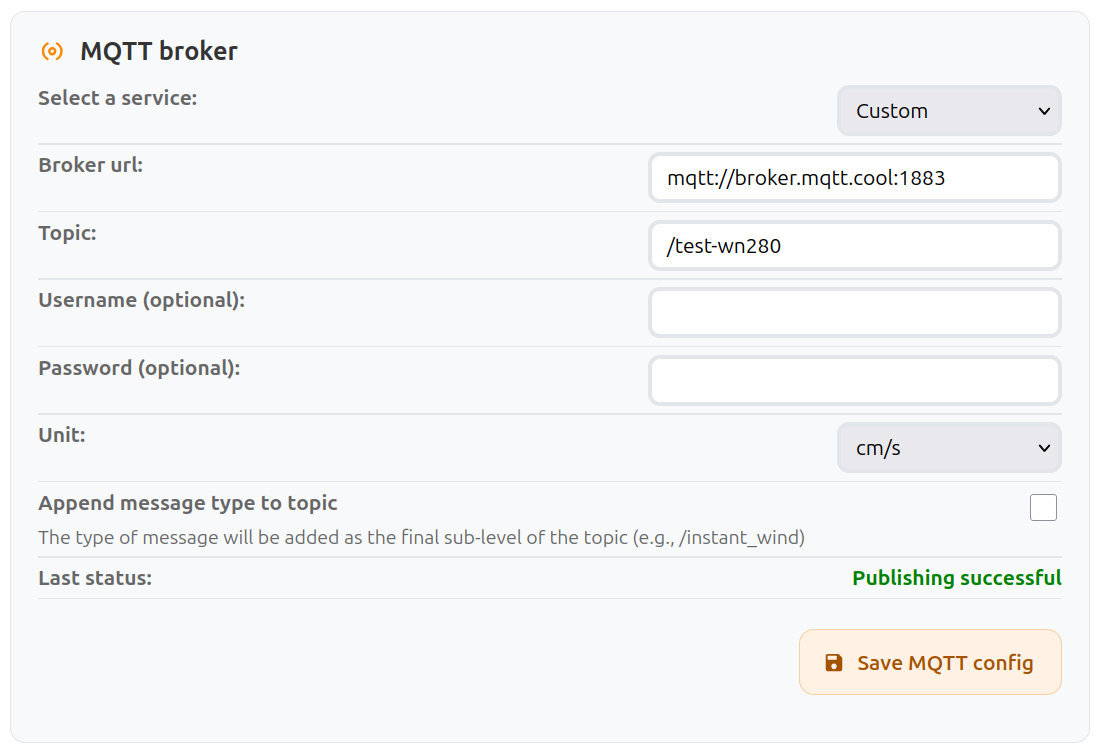
MQTT Broker settings
MQTT allows the anemometer to publish wind data to a broker under a specific topic.
The broker then relays the messages to all clients subscribed to that topic.
This protocol is commonly used in IoT systems.
| Field Name | Type | Description |
|---|---|---|
| Select a Service | Select | Choose between a custom MQTT configuration or a preset for Home Assistant. |
| Broker URL | Input | URL of the MQTT broker. Must start with mqtt:// or mqtts://. |
| Topic | Input | MQTT topic to which wind data is published. Clients must subscribe to this topic to receive updates. |
| Username (optional) | Input | Username required by the broker, if authentication is enabled. |
| Password (optional) | Input | Password associated with the provided username, if required by the broker. |
| Unit | Select | Unit format used in MQTT messages. |
| Append message type to topic | Checkbox | Publish each message type on its own sub-topic: <topic>/instant_wind, <topic>/moving_10mn and <topic>/device_health. |
| Last Status | Info | Result of the most recent publish attempt (success or error message). |
| Save | Button | Apply and store the current MQTT configuration. |
Messages
Messages are published periodically in JSON format. Speeds are rounded to 2 decimals. When a value is unavailable or cannot be computed, the corresponding field is set to null.
- Instantaneous wind is sent every 3 seconds when the device is not in Eco mode.
{
  "type": "INSTANT_WIND",
  "wind_instant_speed": 4.3,
  "wind_instant_dir": 237, // in degrees, ranging from 0 to 359
  "wind_instant_dir_cardinal": "WSW",
  "unit": "m/s"
}
- 10-minute wind: minimum, maximum, and average wind values over the past 10 minutes, sent every minute (every 1, 2 or 5 minutes in Eco mode).
{
  "type": "MOVING_10MN",
  "device_id": 1234,
  "time": 1757750520, // unix time in seconds, omitted until the device knows the time
  "wind_avg": 4.12, // same as wind_avg_1D, kept for compatibility
  "wind_avg_1D": 4.12, // scalar average
  "wind_avg_2D": 3.98, // vector average
  "wind_max": 6.4,
  "wind_min": 2.1,
  "wind_dir": 237, // in degrees, ranging from 0 to 359
  "wind_dir_cardinal": "WSW",
  "reports": [ // custom broker only, newest first
    { "time": 1757750520, "wind_avg_1D": 4.3, "wind_avg_2D": 4.21, "wind_max": 6.4, "wind_min": 2.9, "wind_dir": 240, "wind_dir_cardinal": "WSW" },
    ...
  ],
  "sample_interval": 3, // custom broker in Eco mode only
  "samples": { "speed": [4.5, 4.1, ...], "dir": [241, 238, ...] }, // newest first
  "unit": "m/s"
}
| Field | Description |
|---|---|
wind_avg_1D | Scalar average: the mean of speeds, regardless of direction. |
wind_avg_2D | Vector average: speeds averaged along their direction, lower when the direction varies. |
wind_avg | Same value as wind_avg_1D, kept so existing integrations keep working. |
reports | Custom broker only. The 1-minute reports behind the window, up to 10, newest first. Each one has a time when the device knows the time. |
sample_interval, samples | Custom broker, Eco mode only. Since instant wind is not streamed in Eco mode, the raw 3-second samples recorded since the last successful publish (up to 5 minutes) are attached instead, newest first. |
- Device health information is sent with each 10-minute wind message.
{
  "type": "DEVICE_HEALTH",
  "time": 1757750520, // unix time in seconds, omitted until the device knows the time
  "voltage": 13374, // in mV
  "firmware_version": "0.6.0",
  "ssid": "OUR_HOME_2.4G",
  "rssi": -68, // in dBm
  "local_ip": "192.168.1.22",
  "uptime": 696998, // in seconds
  "free_heap": 95340, // in bytes
  "temp_in": 24.5, // internal temperature in °C
  "eco_interval": 0 // minutes between Eco cycles, 0 when not in Eco mode
}