Wind Widget
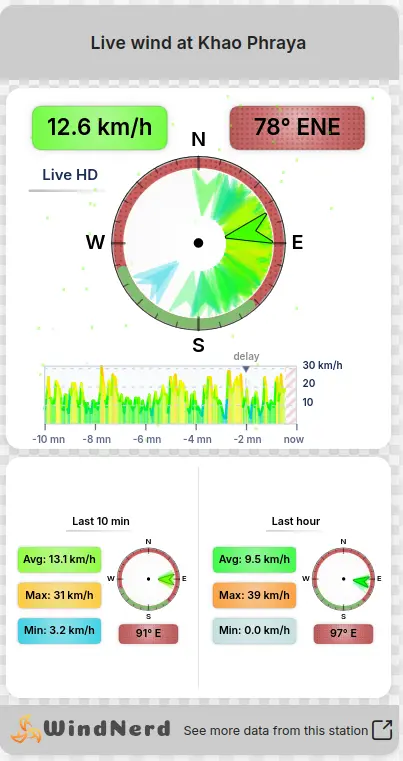
The wind widget shows a station's live wind on any website: your club, school,
campsite or personal page. It is a small page from windnerd.net shown in an
<iframe>, so it updates by itself and needs no code on your side beyond
pasting the snippet.
Getting the embed code
Only public stations (listed or unlisted, see Visibility in Edit Location) can be embedded.
- Open the station page on windnerd.net.
- In the Share tab of the station card, click Embed on your website.
- Customize the widget; the preview updates as you go, and the width buttons above it show how it looks at different widths.
- Click Copy under Embed code and paste the snippet into your page's HTML. Most website builders (WordPress, Wix, Squarespace...) accept it in an HTML or Embed block.
| Setting | Description |
|---|---|
| Header & footer color | Background of the header and footer. Tick Gradient end color to blend into a second color. |
| Header & footer text | Color of the title and of the footer link. |
| Middle background | Background behind the wind graphics, with an Opacity slider. At 0%, your page shows through. |
| Speed unit | km/h, m/s, mph or kn. |
| Logo color | WindNerd logo in its original colors, white or dark, to stay readable on your header color. |
| Height | With Fixed height ticked, the height is written into the snippet (600 px by default). Untick it to size the iframe yourself with CSS. |
The snippet looks like this:
<iframe src="https://windnerd.net/en/widget/my-spot?speed_unit=kn"
        width="100%" height="600" style="border:0;max-width:100%" loading="lazy"></iframe>
The widget always takes the full width of its container. Without a height, an
iframe collapses to a thin strip: if you untick Fixed height, give it one
in CSS, for example style="height:500px", or place it in a <div> with a set
height.
Widget URL reference
You can also write or edit the widget URL by hand:
https://windnerd.net/{language}/widget/{url-key}?{parameters}
{language}:en,fr,es,jaorth. Sets the language of the labels.{url-key}: the station's URL key, the last part of its station page address (my-spotinhttps://windnerd.net/en/my-spot).
All parameters are optional; a missing or invalid value falls back to its default.
| Parameter | Values | Default |
|---|---|---|
speed_unit | kph, ms, mph, kn | kph |
accent_bg | Header and footer color, as hex #rrggbb (write # as %23 in a URL) | #cccccc |
accent_bg2 | Second color of a header and footer gradient, hex #rrggbb | none |
accent_text | Title and footer link color, hex #rrggbb | #222222 |
body_bg | Middle background: hex #rrggbb, rgba(r,g,b,a) or transparent | transparent |
logo_color | original, white, dark | original |
For example, a navy widget in knots with a white logo, in French:
https://windnerd.net/fr/widget/my-spot?accent_bg=%231e3a5f&accent_text=%23ffffff&logo_color=white&speed_unit=kn