Weather Service Upload
Settings available on the local dashboard
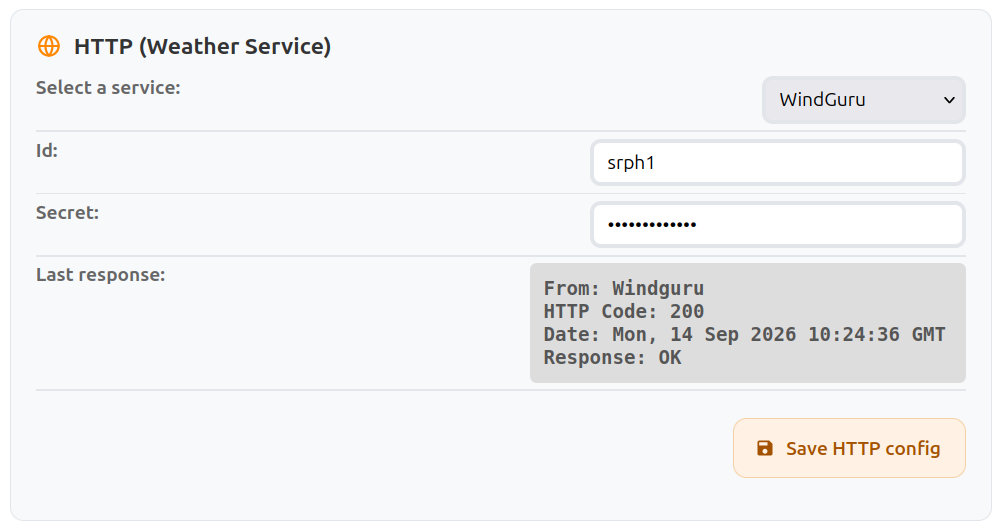
Weather Service Settings
| Field Name | Type | Description |
|---|---|---|
| Select a Service | Select | Choose the weather service to which wind data will be sent periodically: WindGuru, Windy, Wunderground, or Custom HTTP to post to your own server. WindGuru, Windy and Wunderground require an account. |
| Id | Input | Station or user identifier for the selected service. (WindGuru, Windy, Wunderground) |
| Secret | Input | Authentication secret or password for the selected service. (WindGuru, Windy, Wunderground) |
| Last Response | Info | Raw HTTP response from the service during the last data submission, useful for troubleshooting communication issues. |
| Save HTTP config | Button | Apply and store the current weather service configuration. |
Custom HTTP
Custom HTTP posts the wind data as JSON to a URL of your choice, for your own server.
Settings
| Field Name | Type | Description |
|---|---|---|
| URL | Input | Address the data is posted to, starting with http:// or https://. Up to 200 characters. |
| Token (optional) | Input | When set, sent with each request as an Authorization: Bearer <token> header. |
| Posting Period | Select | How often data is posted: every 1, 2, 5 or 10 minutes. |
| Unit | Select | Speed unit used in the payload: cm/s, m/s, kn, km/h or mph. |
| Include 3 sec. samples | Checkbox | Add the raw 3-second speed and direction samples beside the reports. Enabled by default. |
Request
Each post is an HTTP POST with Content-Type: application/json. Any 2xx status code is taken as success; the response body is shown in Last Response.
If a post fails, the next one covers the minutes that were missed as well, up to the last 10 minutes, so a short outage of your server leaves no gap.
Payload
{
  "type": "WIND_REPORT",
  "device_id": 1234,
  "period": 2,
  "unit": "m/s",
  "time": 1757750520,
  "wind_avg_1D": 4.12,
  "wind_avg_2D": 3.98,
  "wind_max": 6.4,
  "wind_min": 2.1,
  "wind_dir": 237,
  "wind_dir_cardinal": "WSW",
  "reports": [
    { "time": 1757750520, "wind_avg_1D": 4.3, "wind_avg_2D": 4.21, "wind_max": 6.4, "wind_min": 2.9, "wind_dir": 240, "wind_dir_cardinal": "WSW" },
    { "time": 1757750460, "wind_avg_1D": 3.94, "wind_avg_2D": 3.75, "wind_max": 5.8, "wind_min": 2.1, "wind_dir": 233, "wind_dir_cardinal": "SW" }
  ],
  "sample_interval": 3,
  "samples": {
    "speed": [4.5, 4.1, 3.8],
    "dir": [241, 238, null]
  },
  "health": {
    "type": "DEVICE_HEALTH",
    "time": 1757750520,
    "voltage": 3962,
    "firmware_version": "0.6.0",
    "ssid": "OUR_HOME_2.4G",
    "rssi": -68,
    "local_ip": "192.168.1.22",
    "uptime": 696998,
    "free_heap": 95340,
    "temp_in": 24.5,
    "eco_interval": 0
  }
}
samples is shortened here; a real post carries 20 samples per minute of period.
| Field | Description |
|---|---|
type | Always WIND_REPORT. |
device_id | Serial number of the device. |
period | Number of minutes this post covers. Normally equal to the posting period; longer after a failed post. |
unit | Unit of every speed in the payload. |
time | Unix time (UTC, seconds) of the post. Omitted while the device does not know the time yet. |
wind_avg_1D | Scalar average speed over period: the mean of speeds, regardless of direction. |
wind_avg_2D | Vector average speed over period: speeds averaged along their direction, lower when the direction varies. |
wind_max, wind_min | Maximum (gust) and minimum speed over period. |
wind_dir, wind_dir_cardinal | Average direction in degrees (0 to 359) and as a compass point. null when unavailable. |
reports | One entry per minute of period, newest first, with the same fields as above. |
sample_interval, samples | Only when Include 3 sec. samples is enabled. Raw samples every sample_interval seconds, newest first, as two arrays of equal length. A direction is null when unavailable. |
health | Device status, same content as the MQTT DEVICE_HEALTH message. |