MQTT Integration
Discontinued
The WindNerd One and One-S are no longer sold. This page is kept for existing owners. Their successor is the WindNerd HQ.
Settings available on the local dashboard
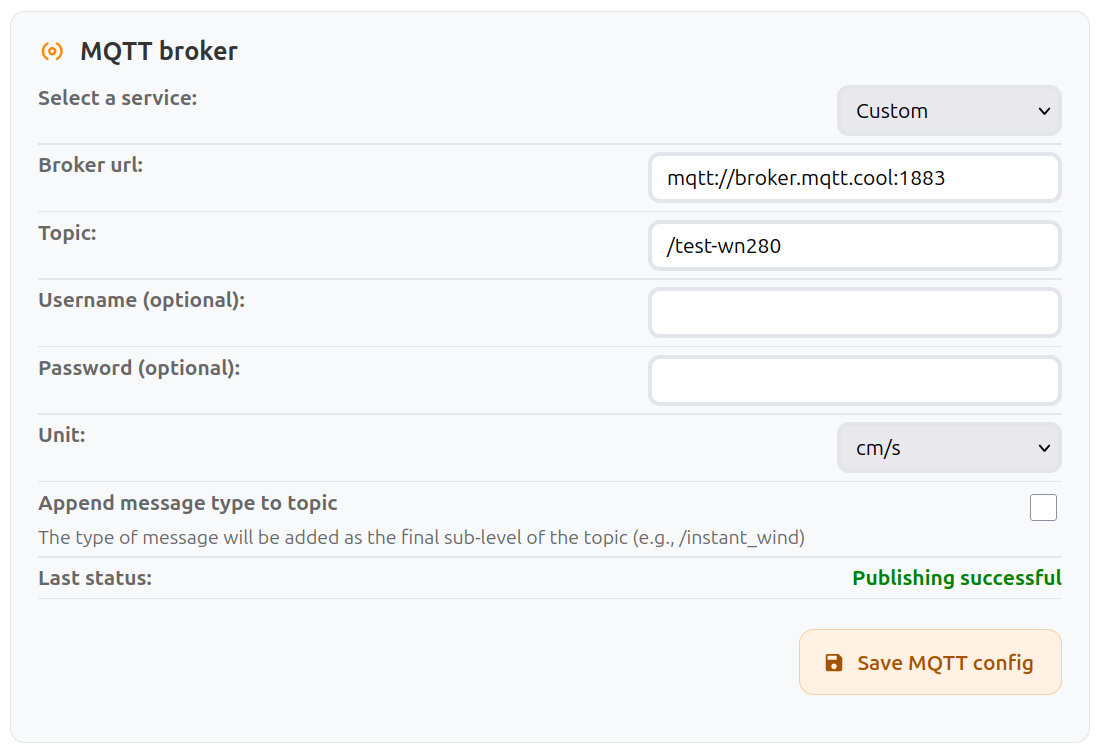
MQTT Broker settings
MQTT allows the anemometer to publish wind data to a broker under a specific topic.
The broker then relays the messages to all clients subscribed to that topic.
This protocol is commonly used in IoT systems.
| Field Name | Type | Description |
|---|---|---|
| Select a Service | Select | Choose between a custom MQTT configuration or a preset for Home Assistant. |
| Broker URL | Input | URL of the MQTT broker. Must start with mqtt:// or mqtts://. |
| Topic | Input | MQTT topic to which wind data is published. Clients must subscribe to this topic to receive updates. |
| Username (optional) | Input | Username required by the broker, if authentication is enabled. |
| Password (optional) | Input | Password associated with the provided username, if required by the broker. |
| Unit | Select | Unit format used in MQTT messages. |
| Append message type to topic | Checkbox | Publish each message type on its own sub-topic: <topic>/instant_wind, <topic>/moving_10mn and <topic>/device_health. |
| Last Status | Info | Result of the most recent publish attempt (success or error message). |
| Save | Button | Apply and store the current MQTT configuration. |
Messages
Messages are published periodically in JSON format. Speeds are rounded to 2 decimals. When a value is unavailable or cannot be computed, the corresponding field is set to null.
- Instantaneous wind is sent every 3 seconds when the device is not in Eco mode.
{
  "type": "INSTANT_WIND",
  "wind_instant_speed": 4.3,
  "wind_instant_dir": 237, // in degrees, ranging from 0 to 359
  "wind_instant_dir_cardinal": "WSW",
  "unit": "m/s"
}
- 10-minute wind: minimum, maximum, and average wind values over the past 10 minutes, sent every minute (every 1, 2 or 5 minutes in Eco mode).
{
  "type": "MOVING_10MN",
  "device_id": 1234,
  "time": 1757750520, // unix time in seconds, omitted until the device knows the time
  "wind_avg": 4.12, // same as wind_avg_1D, kept for compatibility
  "wind_avg_1D": 4.12, // scalar average
  "wind_avg_2D": 3.98, // vector average
  "wind_max": 6.4,
  "wind_min": 2.1,
  "wind_dir": 237, // in degrees, ranging from 0 to 359
  "wind_dir_cardinal": "WSW",
  "reports": [ // custom broker only, newest first
    { "time": 1757750520, "wind_avg_1D": 4.3, "wind_avg_2D": 4.21, "wind_max": 6.4, "wind_min": 2.9, "wind_dir": 240, "wind_dir_cardinal": "WSW" },
    ...
  ],
  "sample_interval": 3, // custom broker in Eco mode only
  "samples": { "speed": [4.5, 4.1, ...], "dir": [241, 238, ...] }, // newest first
  "unit": "m/s"
}
| Field | Description |
|---|---|
wind_avg_1D | Scalar average: the mean of speeds, regardless of direction. |
wind_avg_2D | Vector average: speeds averaged along their direction, lower when the direction varies. |
wind_avg | Same value as wind_avg_1D, kept so existing integrations keep working. |
reports | Custom broker only. The 1-minute reports behind the window, up to 10, newest first. Each one has a time when the device knows the time. |
sample_interval, samples | Custom broker, Eco mode only. Since instant wind is not streamed in Eco mode, the raw 3-second samples recorded since the last successful publish (up to 5 minutes) are attached instead, newest first. |
- Device health information is sent with each 10-minute wind message.
{
  "type": "DEVICE_HEALTH",
  "time": 1757750520, // unix time in seconds, omitted until the device knows the time
  "voltage": 13374, // in mV
  "firmware_version": "0.6.0",
  "ssid": "OUR_HOME_2.4G",
  "rssi": -68, // in dBm
  "local_ip": "192.168.1.22",
  "uptime": 696998, // in seconds
  "free_heap": 95340, // in bytes
  "temp_in": 24.5, // internal temperature in °C
  "eco_interval": 0 // One-S only: minutes between Eco cycles, 0 when not in Eco mode
}